Why I Want Accessibility Options On by Default
Listen to this article
The narration could not be loaded.
0:00 / --:--
I think accessibility and assist features should usually be on when you first start a game, with a way to turn them off. People can then try them and decide what works. I care about that because I know how much effort it can take to find a tool you didn’t know was there.
I have albinism and low vision, and I research accessibility for people with low vision. I use screen magnification and high contrast, and I sit close to my screens. Finding useful tools and ways to use them has often depended on my own trial and error.
Marvel’s Wolverine brought this to mind. The game came out on September 15, with a glowing scent trail that guides players through parts of the story. Some players have called the guidance “hand-holding,” and critic Gene Park nicknamed the trail “fart gas” (Kotaku). I understand why someone who wants to find their own way would want to turn it off. I also think it matters that players encounter useful help before they know to ask for it.

Trying a feature before deciding
A lot of accessibility depends on awareness of what tools are available. I can’t choose a feature I don’t know exists. I also might not know whether it helps me from its name in a settings menu. Sometimes I have to try it first.
When a feature starts on, I can see or hear what it does while I use the game. I can keep it, adjust it, or turn it off. Someone who has never considered that kind of help gets the same chance to learn about it. That opportunity to try a feature is why I favor having suitable assist features on by default.
When a feature starts off, a player has to find the setting, understand its description, and try it without knowing whether it will help. That asks a lot of someone who may already be struggling to see or navigate the interface. A setup menu can help, but it still depends on players recognizing what they need from a list of options.
I know that a default someone doesn’t want also creates work. They have to stop, find the setting, and switch it off. For example, a player who finds a guiding line distracting first has to know what the game calls it, and then find it in a long list of options. Usually, I think that is less work than searching through unfamiliar options for a feature you might need. But I don’t want to assume that turning it off is always easy. If the setting is hard to find, that can be frustrating too.
So I want games and apps to make settings easier to search and understand. A player should be able to find a feature after first trying it, and then choose whether to keep it. That matters for both the person who needs the help and the person who doesn’t want it. This is why I think it’s important to make settings easy to find and try, which I discuss in Making settings easier to find and try.
How I have found help for myself
For me, and for people I know, useful tools can go undiscovered. You may keep doing something the hard way because you don’t know a tool exists, or because you don’t know another way to use one you already have. Finding out can depend on trial and error and on knowing where to ask for help. That takes effort that the design rarely acknowledges.
I’ve used text-to-speech services for many years. But only after buying a new mouse and playing around with Balabolka, a free text-to-speech program, did I discover that I could combine the two. I can use the extra buttons on my mouse to have selected text read out loud right away. That has been a game changer for me. I get support on demand, when I want and need it. A screen reader, in comparison, is cumbersome and difficult to use, and it reads out much more content than I want. In the end, I do want to use my residual vision as much as I can. It took a new mouse and some trial and error for me to find this way of reading.


Sometimes the tools we need don’t exist, or they are very hard to find. Then people have to create their own DIY solutions. For example, I recently built SlideNotes, a small web tool that lets me view and comment on slides. I find doing that in Google Slides or Figma very inaccessible with low vision. I made something that works for me and shared it in case it helps others.

AI makes it easier to build small DIY tools like this. But building one can still require a subscription, as well as the knowledge and experience to use AI for the job. I don’t think people should have to build their own solution just to discover a useful way to work. In a game, a helpful default can introduce an option to people who would never have searched for it.
Where Wolverine gives players a choice
Wolverine shows why the option to turn something off matters. The story scent trail starts on, but as of September 26 it still can’t be turned off. That is a reasonable reason to complain, especially if you want to explore without that guidance. I support the default being on, but I also want an off switch.
After players criticized the trail, Insomniac reduced its opacity for everyone. Can I Play That? argued that a less visible trail could be harder for low-vision players to use. A later update added off switches for three collectible aids, while story-critical Senses still appear. I would have preferred a choice for the story trail too, along with control over its intensity. That would let players who want the visual guidance keep it visible and let others reduce or turn it off.

I don’t know whether the story trail is an accessibility feature in the strict sense. Insomniac hasn’t called it one, and I haven’t seen anything that measures how low-vision players use it. The concern about visibility still deserves attention. A visual guide can help some players even if the game did not label it as an accessibility option.
The game has a clearer example of my argument. Its screen reader starts on and asks at first boot whether to keep it. A player can turn it off with one button. Subtitles are also on by default, according to SightlessKombat’s review. It makes sense to me that the menus start out speaking, so nobody has to navigate a silent menu just to find the screen reader.
The same reviewer said the game doesn’t explain how to use Navigation Assist, which starts off. That is the discovery problem I worry about. The game offers help, but a player first has to be motivated to seek it out. Only then can they learn that it exists, find it, and figure out how it works. If you don’t know a feature exists, it is hard to be motivated to look for it.
Wolverine also offers a High Contrast mode with choices for character and object colors, outlines, and the background. Players have to turn it on themselves. It gives players ways to adjust the visuals. I would like the story trail to offer similar control.

Making settings easier to find and try
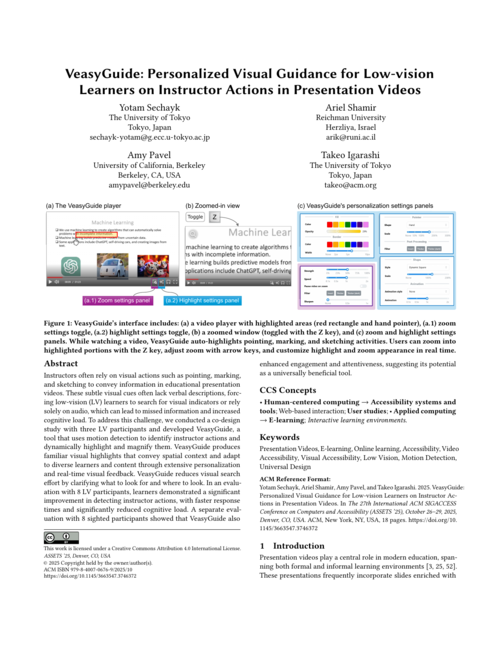
I would start suitable accessibility and assist features on when players can easily turn them off. I would also make accessibility settings visible from the very beginning. For example, a setup menu when the game first starts could go through the accessibility features, give examples of what each one can help with, and let players choose what to keep. After that, I would keep the controls easy to find, including a way to search settings. Call of Duty: Modern Warfare III, for example, tags settings for motor, vision, audio, or cognitive adjustments. Players can filter by those tags (Call of Duty). For visual guidance, I would also offer intensity and color choices where they make sense. Different players may need different levels of visibility, so I wouldn’t reduce the trail to one intensity for everyone. We found this in our work on VeasyGuide (Sechayk et al., 2025), where low-vision learners personalized the visual guidance in presentation videos. People chose different colors, shapes, and thickness, because what worked for one person didn’t work for another.
Wolverine’s first-boot presets can introduce features, but a category such as “Vision” still asks players to recognize a need in advance. I would also show what an option does while someone chooses it. This is sometimes called WYSIWYG, “what you see is what you get.” Forza Horizon 6 shows a live preview of most settings in the game world as you change them. Marvel’s Spider-Man on PC applies graphics changes instantly behind the pause menu (Digital Foundry). I would like the same approach for accessibility settings. If I can see what High Contrast or larger subtitles do while I’m choosing them, I don’t have to guess from their names.
Showing how people use settings
I’d like settings to explain more than what an option does technically. A short note could describe how low-vision testers experienced a High Contrast mode, how blind testers experienced audio cues, or how Deaf and hard-of-hearing testers experienced captions. These would be examples of what an option can do for someone, rather than promises that it will work the same way for every player.

A lot of accessibility strategies spread by word of mouth. Hearing about someone else’s experience is often what makes you think, “Maybe I have a similar need,” or “That could be really helpful for me.” To make that possible in a game, developers would need to include disabled people in testing and put their experiences next to the relevant settings, where players can find them.
Finding help without going through every option
Having many settings can be good for accessibility because players can fine-tune the game. But a long list can also be overwhelming when you don’t know what you need. Wolverine advertises over 100 accessibility features (PlayStation Blog). Going through a long list of options one by one can lead to decision paralysis, especially if you’re not sure what you need in the first place. So I think there should be a balance between the number of settings and the accessibility they actually provide.
An AI assistant could offer another way to reach the settings. As a low-vision player, I could say, “I can’t tell which objects I can interact with,” or “I’m not sure which way I should go.” The assistant could surface the relevant settings and change them for me. I could try the result while playing, then keep it or change it back.

I want more people to encounter these tools, including people who have never thought of looking for them. Some will turn them off. Others may find something useful that they would not have found in a menu. Making features easy to try, adjust, and turn off would give both groups a useful choice.
If you found this useful, please cite this as:
Sechayk, Yotam (Sep 2026). Why I Want Accessibility Options On by Default. https://tomfluff.github.io.
or as a BibTeX entry:
@article{sechayk2026why-i-want-accessibility-options-on-by-default,
  title   = {Why I Want Accessibility Options On by Default},
  author  = {Sechayk, Yotam},
  year    = {2026},
  month   = {Sep},
  url     = {https://tomfluff.github.io/blog/2026/accessibility-on-by-default/}
}
References
- ASSETS
Enjoy Reading This Article?
Here are some more articles you might like to read next: